
Many newer heavy trucks have a telematics connector built for this purpose. Here is where it lives on each make and how the cable goes in.
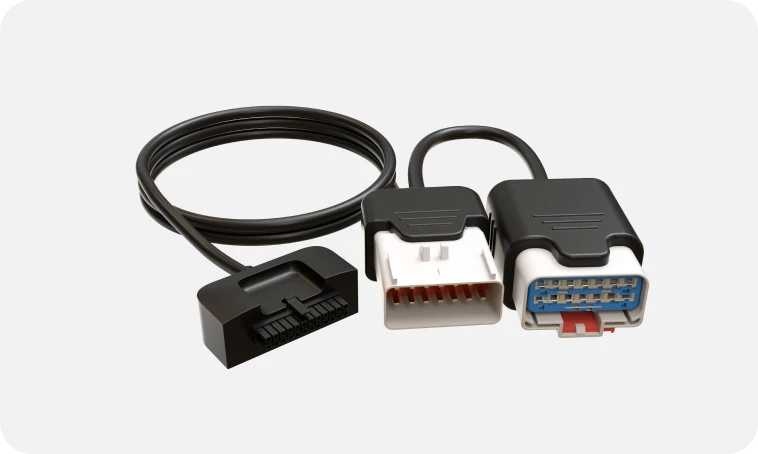
Cable 3035 meets the TMC RP1226 specification, which Motive calls a new standard telematics connection point in certain trucks. Certain Peterbilt, Kenworth, Freightliner and Volvo models use it. Cable 3036 is a Y-cable to the same specification and must be used with the 3035. The install article does not describe other differences.
Many newer heavy-duty vehicles with an RP1226 connector also have a standard diagnostic port. Motive recommends using the RP1226 connector and not the diagnostic port, because connecting to the diagnostic port may void the vehicle's warranty.
| Vehicle | Location Motive lists |
|---|---|
| Kenworth and Peterbilt | Driver's left side of the cab, behind the fuse box. The panel below the 9-pin port may need to come off. |
| Freightliner Cascadia and New Cascadia (2018 and newer) | Passenger side of the cab, behind a lower panel. |
| Freightliner M2, 108SD, 114SD (2020 and newer) | Passenger-side doghouse under the fuse box, or the center of the overhead console if there is one. |
| International HV, HX, LT, MV, RH | Floor under the center console, behind the bottom panel. |
| Western Star 47X and 49X | Left side of the passenger-side dash, behind the center console. |
| Mack | Passenger-side dash, behind or under the fuse box. |
| Volvo | Top of the dash near the fuse box. |
1. Engage the parking brake, turn the engine off and switch off the main power switch if there is one.
2. Choose a gateway spot, on top of the dash or beneath it.
3. Find the RP1226 connector and push the orange tab over to lock it.
4. Connect the serial end of the cable to the gateway and finger-tighten the thumbscrews.
5. Put the DB-15 end at the top of the dash, replace the fuse box panel and secure the DB-15 end to the gateway.
6. Dash mount: clean the surface, use the adhesive strips, logo up, away from heavy metal. Mount near the windshield, away from vents and electrical parts, and at least 12 inches from metal.
7. Start the engine. The lights flash, then show solid red. After about a minute the left light turns green.
8. When the driver connects through the Driver App, the right light turns green for a Bluetooth connection.
Motive warns that regulations may prohibit any Y-cable setup that relocates the in-vehicle diagnostic port. Make sure the install does not relocate it on vehicles that may operate in California.
Walk the list above before you pull any panels, because the location depends on the make and model year, and two trucks from the same maker can differ. Keep the removed fuse box panel and its fasteners together so the cab goes back together as it came apart. The orange tab is the lock, and a connector that is not locked can work loose over the road miles. Keep the gateway at least 12 inches from metal and near the windshield, as Motive says, so GPS has a clear view.
Cable lengths and what separates the 3035 from the 3036 beyond the Y-cable note.
Motive says connecting to the diagnostic port may void the vehicle warranty on trucks that have both.
A Y-cable to the RP1226 specification that must be used with the 3035.
Push the orange tab over.
Sources: Motive help center, Cable 3035 and 3036 for RP-1226 and Cables overview, read Nov 25, 2026
Tell us how many vehicles you run and what you want to see, and we will match you to the right Motive devices and the install that goes with them.
We Supply It. We Install It. One Call.
