
Four numbers, one job: connect the Vehicle Gateway to an OBD-II port. Here is how they differ and how the install goes.

Motive's help center groups cables 3010, 3015, 3017 and 3018 as the OBD-II family. The article covers light, medium and heavy-duty vehicles built from 2008 onward that have an OBD-II port. Check the white label on the cable to see which number you are holding.
| Cable | What Motive says |
|---|---|
| 3015 | Low-profile straight cable for direct plug-in. Recommended for California fleets and for any install where the port should not be moved. |
| 3017 | Y-cable for covert installs behind the dash. |
| 3018 | Y-cable, the current Dual CAN version, mainly for under-dash installs. |
| 3010 | An earlier cable. The install steps still apply. |
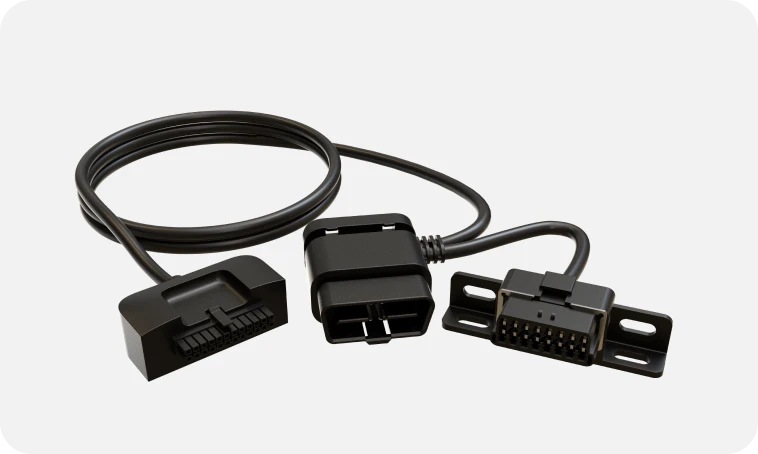
The article gives no cable lengths, so we do not list any.
Set the parking brake, turn the engine off, switch off the main power switch if the vehicle has one, and remove the key.
1. Decide whether the gateway goes on top of the dash or discreetly underneath.
2. Find the OBD-II port. Motive says it is typically under the steering column or beneath the passenger dash panel.
3. Connect the cable. For the 3015, plug the OBD-II end straight into the port. For the 3017 or 3018, remove the vehicle's own port from its dash receptacle, plug the Motive cable's male end into it, and put the female end into the original receptacle. Do not plug into the vehicle port yet.
4. Check there is room for the gateway, route the cables neatly, tie them down and avoid pinching.
5. Attach the 15-pin connector to the gateway and tighten the thumbscrews.
6. Orient the gateway with its logo toward the sky and not under heavy metal, which can block GPS.
7. Clean the surface with the alcohol pad and attach the gateway with the adhesive strips, logo up.
8. Secure it under the steering wheel with zip ties without blocking the pedals.
9. Plug the serial end into the gateway and start the vehicle.
The left light turns green when GPS connects, and the right light blinks red while the engine runs. Both should come on within about a minute. The Lights and Sounds page covers every other pattern.
Motive warns that regulations may prohibit any Y-cable setup that moves the vehicle's diagnostic port. For a vehicle that may operate in California, the install must not relocate the port, which is why Motive points those installs to the 3015.
The order in Motive's steps is the point. The cable goes into the vehicle's port first, the gateway gets its 15-pin connector and thumbscrews second, and the gateway is stuck down last, once you know it reaches. Do not press the adhesive strips down until the cable length, the GPS view and the foot pedals are all settled. On a Y-cable install the vehicle's own port ends up in a different spot than before, so tell the fleet manager where it went and make sure a technician can still reach it. A tidy routing with zip ties and nothing pinched is what keeps the connection solid for the life of the vehicle.
Lengths, the exact vehicles each cable fits beyond the 2008 and newer note, and the difference between the 3010 and the later cables.
Motive recommends the 3015 for California fleets, since it plugs straight into the port and does not move it.
Both are Y-cables for under-dash installs. Motive calls the 3018 the current Dual CAN version.
Check the white label on the cable.
Sources: Motive help center, Cable 3010, 3015, 3017 and 3018 installation guide, read Nov 25, 2026
Tell us how many vehicles you run and what you want to see, and we will match you to the right Motive devices and the install that goes with them.
We Supply It. We Install It. One Call.
