
Every vehicle we touch today has a data bus. It's how the engine, the body control module, the dash, and the transmission talk to each other over a couple of wires instead of hundreds. It's also how most of our trackers get engine hours, speed, fuel, fault codes, and odometer without a single splice. Understanding the bus is the difference between an installer and a good installer.
Also called: logic line, data line, multiplexing, CAN, or just "the bus."
A data bus lets one wire (or one pair of wires) carry many different pieces of information. Instead of running a heavy wire from every switch to every device, the manufacturer runs small wires to a computer, and the computer decides what to do.
Manufacturers do it for three reasons:
Picture twenty people getting on a bus, each with one job to do when they get off. The bus drives to the destination. Each person steps off and does their task: one unlocks the doors, one rolls up the windows, one turns on the cruise control. One bus, one trip, twenty jobs.
That's the data bus. One wire, many messages, and each module on the wire listens for the messages meant for it.
The original version. One wire carries different resistance values and the body control module reads them. 1,500 ohms might mean lock, 250 ohms might mean unlock, and so on. Common on Chrysler, GM, and Ford products from the late 1990s through the 2000s.
To trigger a function on one of these, a device puts the right resistor in line on the wire. See the Resistors chapter for values and how to build them. Get the value wrong and nothing happens, or the wrong thing happens.
Since roughly 2008, every light-duty vehicle sold in the US has CAN bus (Controller Area Network) on the OBD-II port. Heavy trucks use J1939, which is CAN bus with its own connector and message set.
CAN runs on a twisted pair: CAN High and CAN Low. The two wires carry mirror-image signals, and the twist cancels noise. Both ends of the bus have a 120 ohm terminating resistor. Meter across CAN High and CAN Low with the vehicle off and you should read about 60 ohms (two 120s in parallel). If you read 120, one end is missing its terminator. If you read open, the bus is broken.
Data trackers read engine data by listening to this pair. That's how they get RPM, speed, fuel level, engine hours, odometer, seat belt, and fault codes without touching a single factory wire.
The 16-pin port under the dash. Most plug-and-play trackers connect here.
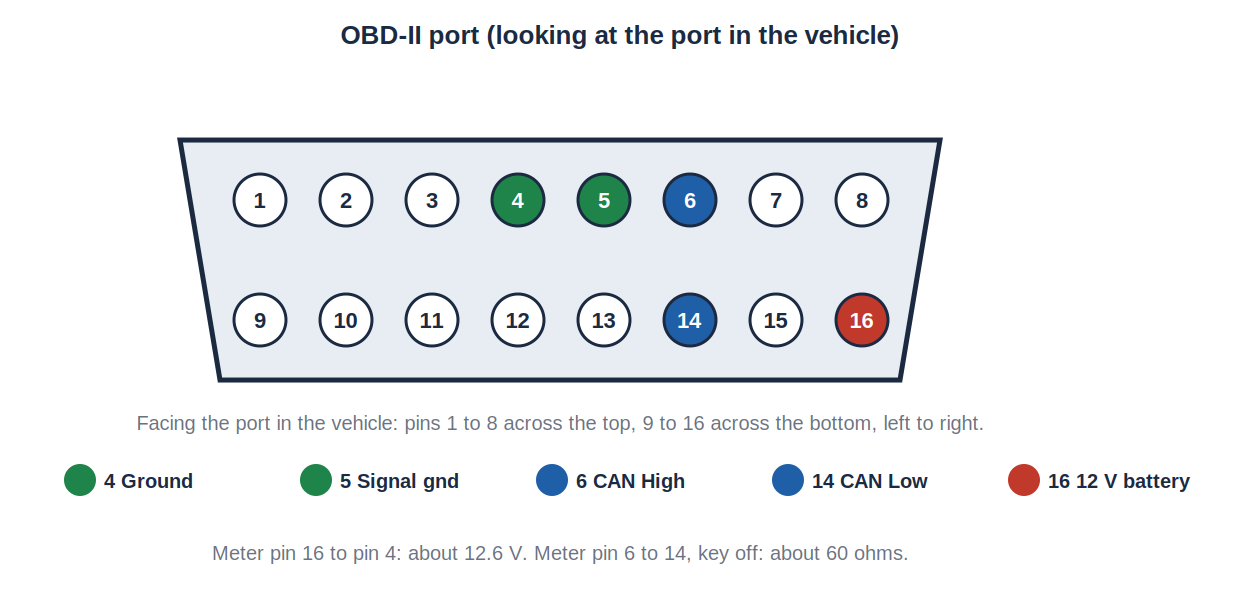
The pins that matter:
| Pin | Function |
|---|---|
| 4 | Chassis ground |
| 5 | Signal ground |
| 6 | CAN High |
| 14 | CAN Low |
| 16 | Battery constant 12 volt |
The port has power, ground, and the bus. That's why a plug-in tracker needs nothing else.
For a hidden install, use a Y-cable or OBD extension harness that keeps the factory port free for the shop's scan tool. Never leave a fleet vehicle without a working OBD port.
Class 6, 7, and 8 trucks use a round 9-pin Deutsch connector, usually under the dash on the driver's side.
Most heavy-duty trackers use a J1939 Y-cable so the port stays available. Some older trucks (pre 2007 or so) use a 6-pin Deutsch connector running J1708/J1587 instead, which is a slower older bus. Check what the truck has before you order the harness.
Some devices, and some vehicles, need a direct connection to CAN High and CAN Low behind the dash. When that's the only option:
A bad CAN tap doesn't just kill your tracker. It can take down the whole bus and put the vehicle in limp mode or leave it dead. That's a tow, not a callback.
Almost everything we do on the bus is read-only. The tracker listens and reports. It doesn't send commands.
Controlling a function through the bus (locking doors, remote start) takes a data bus interface module (sometimes called a bypass or CAN interface). Those modules translate a device's simple output into the right bus message for that specific vehicle. They're vehicle-specific, they have to be programmed, and they're the only safe way to send commands to a bus. For fleet work, the main case is a starter interrupt on a push-to-start vehicle, where there's no key cylinder to interrupt.
This is the sales side, and it's worth knowing on the install side too. A bus-connected tracker can report:
A tracker wired to only power, ignition, and ground can report location and ignition on/off. That's it. The bus is where the value is.
Rather have us do it? We install GPS, dash cams and telematics across Georgia, South Carolina, North Carolina, Tennessee, Virginia, Alabama, Florida and Mississippi, at your yard. Get a free quote or call/text 803-513-1009.
This information is provided as a guide. Verify every circuit with a digital multimeter before connecting to it. Proper installation is the responsibility of the installer.
We install GPS, dash cams and telematics across GA, SC, NC, TN, VA, AL, FL & MS — at your yard, on your schedule.