Move the device behind the dash on a Y-split or T-harness and three things get better at once: it stays where you put it, the data keeps coming, and the shop can still plug in a scan tool. Everything below is why that one small part matters more than it looks.
The short answer
A tracker plugged straight into the factory OBD-II port is doing its job right up until someone’s boot catches it. That port sits low on the driver’s side, in the same space as knees, work boots and bags.
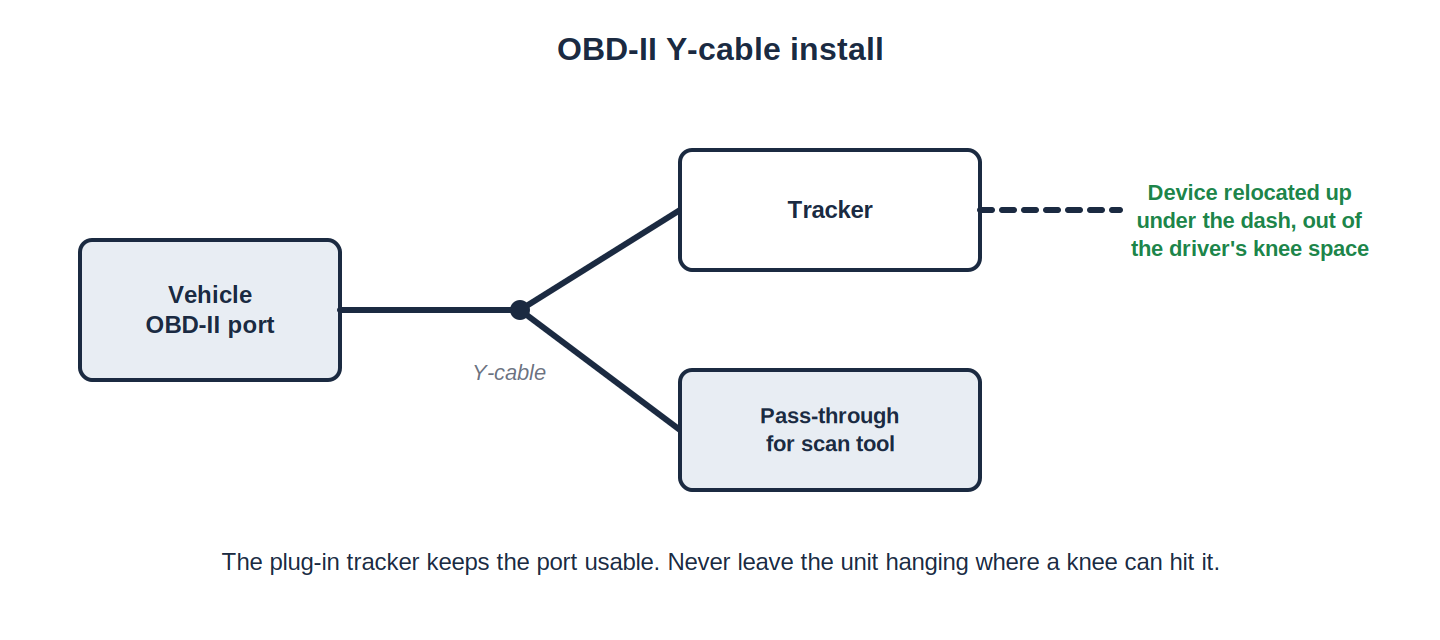
- Straight into the port: exposed, down in the footwell, and anyone can pull it out by hand.
- On a harness: the device sits behind the dash and the port stays open for a scan tool.
- Same device either way. What changes is where it lives, not what you bought.
- Already know which one you need? The harnesses are on the Install Parts page.
What happens to a device left hanging on the port
In our years of field experience we have seen plenty of vehicles where an exposed GPS device was kicked, struck or pulled. The damage rarely stops at the device.
- The port takes the hit. The factory OBD-II connector and the components around it are what get bent or broken.
- That is the expensive half. A tracker is a tracker. A damaged diagnostic connection often means a dealership visit.
- The vehicle goes off the road while that happens, which usually costs more than the repair itself.
- The device normally survives. Worth saying plainly — the port is what costs money.
We have watched this play out
This is not theory. We have seen it many times: a company decides to save money on installation and has its own drivers plug the devices into the OBD-II port themselves. It works for a while, and then the calls start.
One large fleet did exactly that across their vehicles. Here is what they ended up paying for:
- The original install — real money spent having drivers put the devices in.
- A service call — real money again, bringing us out to those same devices.
- A dealer referral — in plenty of cases there was nothing we could do on site, because the damage was to the port itself. That is a dealership job.
- Device repairs — in other cases they paid us to repair the unit that got kicked.
- Downtime on top of all four.
The saving they were chasing was the install. A harness on the first visit would have taken every one of those off the table.
Anyone in the vehicle can unplug it
This is the one people underestimate. When a device is plugged into an accessible port, a driver — or anyone else with access to the vehicle — can simply pull it out. No tools, nothing to undo afterward.
- You get a gap, not a breakdown. No location, no engine data, nothing to check a job against.
- You are still paying the subscription for those hours.
- Nothing looks wrong, which is why it can run for weeks before anyone asks.
- Concealing it removes the option on the vast majority of vehicles, because there is nothing on show to pull.
The shop still needs that port
A diagnostic port with a tracker sitting in it is a port nobody can use.
- Somebody has to unplug it to get a scan tool in — and quite often nobody plugs it back in.
- That is a callback waiting to happen, and it lands on you, not on the shop.
- It happens more than you would think. A device that is easy to unplug is a device that gets unplugged.
“But our platform alerts us when a device is unplugged”
Most platforms do, and it is a useful feature. It is also a record of something that has already happened.
- An alert is not the data. It tells you tracking stopped at 9:40. It does not tell you where the vehicle went afterward.
- Someone still has to go and fix it. In your own yard that is five minutes. At a customer site three hours away it is a trip.
- Or you talk a driver through it — the same driver who may have unplugged it.
- A concealed device never raises the alert, because there is nothing in the footwell to catch or pull.
Does putting it behind the dash hurt the signal?
Reasonable question, and the answer is no when it is done properly. Fleet telematics devices are built to be mounted out of sight — that is the normal installation for hardwired units and has been for years. Behind a dash is plastic and air, not a metal box.
In practice a harness usually improves the signal, because it is the thing that gives you a choice of where the device goes at all.
- Plugged straight in, there is no choice. The device goes where the port is — low down, under the dash, with the most metal and the least sky above it. That is the weakest spot in the vehicle for a signal, and it is the only spot on offer.
- The harness gives you cable to work with. The device can be mounted much higher up inside the dash, nearer the windshield.
- Higher means a clearer view of the sky for GPS, and generally a better cell signal too.
- More satellites in view means a tighter fix. The position on the map is more accurate, so a vehicle sits on the right side of the street instead of somewhere near it.
- Fewer spotty stretches. A weak fix is where you get gaps in the breadcrumb trail, points that jump, and stops that get logged in the wrong place. Mounting higher takes most of that away.
- Higher also means further from knees and boots, so the same move that helps the signal is the move that stops the damage.
The rest is ordinary installer judgement — away from large metal supports, away from anything that gets hot, and secured so it is not resting against a moving part. Get that right and the device reports better than it did hanging off the port, not worse.
What a Y-split or T-harness actually changes
- The device moves behind the dash. Out of the footwell, out of sight, out of reach.
- And it can go high. The cable length lets the device be mounted well up inside the dash instead of dangling at the port — better for the signal, and out of the way of knees and boots.
- The diagnostic port stays live. The harness passes it straight through, so a scan tool plugs in normally with the tracker still connected.
- Nothing is cut and nothing is spliced. The factory wiring is untouched.
- It fits what you already run. If your tracker uses the standard 16-pin OBD-II pass-through housing — and most fleet telematics devices do — a harness will work with it.
We already have a fleet plugged straight in. Now what?
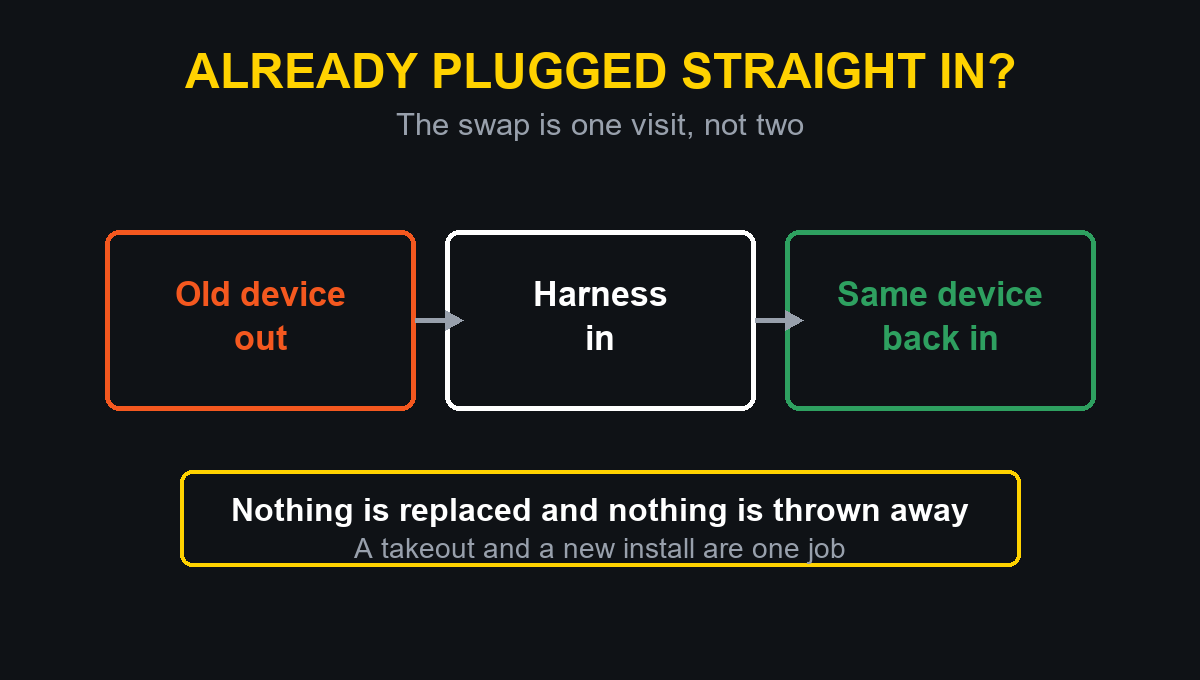
- Nothing gets ripped out. The existing device comes out and goes back in on a harness in the same visit — a takeout and a new install are one job, not two.
- It is not a shutdown. With units staged ahead of time a crew can work through 40 to 50 vehicles in a day, so a yard gets done between shifts.
- Stage it if you prefer. Start with shared vehicles, routes with high driver turnover, and anything that visits a shop regularly.
- Those are where the exposure is, and where devices go missing first.
Warranty, lease return and resale
A Y-split or T-harness is plug and play. Nothing is cut, nothing is spliced, and the factory wiring is left exactly as it was. That matters in three places people tend to think about too late:
- A warranty conversation with a dealer.
- A lease return inspection.
- The day you sell the vehicle on.
It also comes out as cleanly as it went in, so the harness can move to the next vehicle rather than being written off with the old one.
Is it definitely a 16-pin OBD-II port?
Worth a look under the dash before you order.
- Flat trapezoid shape, sixteen pins in two rows.
- Driver’s side, under the dash, usually near the steering column or the kick panel.
- If it is round with a locking ring, it is a heavy-duty connector and needs a different harness.
If you are not sure, photograph the port and email it to info@apisignalcorp.com.
The parts are on the shelf. OBD-II Y-cables and T-harnesses are on our Install Parts page — the pieces you cannot pick up at a parts store when you are standing at a truck and need one today.
Is it worth it on a whole fleet?
Run the comparison on one vehicle and it answers itself. A harness is a small line on an install. Against it, put:
- A dealership repair to a diagnostic connection.
- The hours that vehicle is off the road.
- The tracking you paid for and did not get.
- The chasing — the calls, the visits, the plugging back in.
It only has to prevent one of those to have covered itself, and across a yard of vehicles it will prevent more than one. The quiet benefit is the one nobody writes down: installs that stay installed.
Frequently asked
Can a driver unplug a GPS tracker?
If it is plugged directly into the OBD-II port, yes — by hand, in seconds. On a harness the device sits behind the dash with nothing exposed, so there is nothing obvious to pull.
Does a Y-split harness keep the OBD-II port usable?
Yes. That is the whole point of the pass-through. A technician plugs a scan tool into the port as normal and the tracker stays connected the entire time.
Will a harness fit my vehicles?
If the vehicle has a standard 16-pin OBD-II port and the tracker uses the standard pass-through housing, yes — that covers all major vehicle brands.
Get the harness. OBD-II Y-cables and T-harnesses, in stock and priced on the page. Shipping is $12.99 for the first item and $1.00 for each additional item.
Shop Install Parts
Rather have us do it? We install GPS, dash cams and telematics across Georgia, South Carolina, North Carolina, Tennessee, Virginia, Alabama, Florida and Mississippi, at your yard. Get a quote.
This information is provided as a guide. Verify every circuit with a digital multimeter before connecting to it. Proper installation is the responsibility of the installer.
