
This is the Plus camera's cable for vehicles with an OBD-II port. It has three labeled ends, and you choose a direct connection or a Y-cable setup.
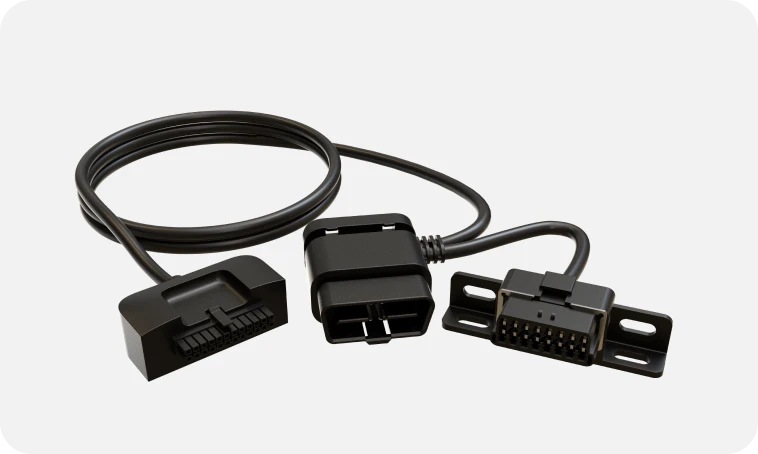
VCBL-Y-OBD2 is the OBD-II cable for the AI Dashcam Plus. Motive's list of Plus cables says it supports direct connection and Y-cable installs, with brand-specific mounting brackets: select the bracket matching the vehicle's OBD-II port and attach the spare diagnostic connector (P3) to it. Motive's examples include a Ford F-150 (2019) and a Volvo 9700 (2017). The cable ships with cable ties.
| End | What it does |
|---|---|
| P1 | Connects to the vehicle adapter |
| P2 | Connects to the vehicle's diagnostic port |
| P3 | Optional. Goes into the dash receptacle in a Y-cable setup to keep diagnostic access |
The OBD-II port is typically black and sits under the dash on the driver's side, in the center console or near the steering column.
A screwdriver set, a plastic pry bar and a socket set.
1. Plug the Plus camera's cable into the vehicle adapter, then plug the adapter into P1.
2. Pick the connection method:
3. Test and mount the camera using the AI Dashcam Plus install guide. It mounts on the windshield or on the left side of the rearview mirror.
4. Start the engine. Motive says that when the alert, or right, light turns blue, the camera is powered on and connected.
Motive warns that regulations may prohibit any Y-cable setup that relocates the in-vehicle diagnostic port. For vehicles that may operate in California, use the direct connection.
Direct is the simplest install and the one to use in California. A Y-cable is the covert option, since the vehicle's port ends up behind the dash and the cable disappears, but it moves the port. Use the Y-cable only where the fleet wants the hidden look and the law allows it.
Seat the adapter and each end fully before you start the engine, and route the cable with zip ties so nothing hangs in the driver's legroom. Do the blue light check before you stick the camera to the glass, since a failed power-up is easier to fix before the camera is mounted.
The Plus camera has its own cable family, named VCBL for the connection type: VCBL-Y-OBD2 for OBD-II, VCBL-Y-1939 for 9-pin, VCBL-Y-1226 for RP1226 and VCBL-Y-6PIN for 6-pin. Each one is a Y-cable that can also be used direct. The numbered cables in the 3000 series belong to the Vehicle Gateway, so do not mix the two families on an order. The camera connects to the vehicle adapter first and the adapter connects to P1, and that is the same on every Plus cable.
Cable length and a full vehicle list. The Cables and Accessories page has the numbered cables for the 3000-series gateway, which are a different family.
P1 connects to the vehicle adapter, P2 to the diagnostic port, and P3 is the optional end for a Y-cable setup.
Motive says the alert, or right, light turns blue.
Motive points California installs to the direct connection.
Sources: Motive help center, Cable VCBL-Y-OBD2 install guide and AI Dashcam Plus Cables, read Nov 25, 2026
Tell us how many vehicles you run and what you want to see, and we will match you to the right Motive devices and the install that goes with them.
We Supply It. We Install It. One Call.
