
For older Class 6 to 8 tractors and vocational trucks with a round 6-pin port, the Plus camera has its own 6-pin Y-cable.
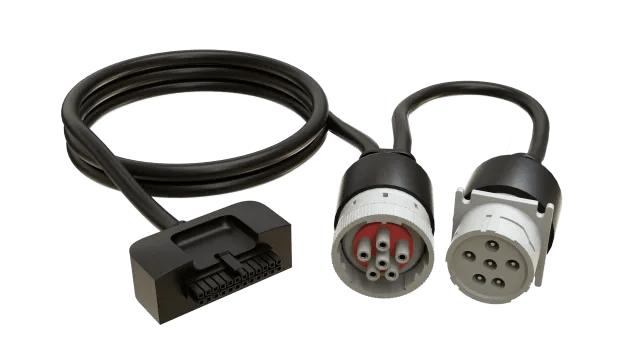
VCBL-Y-6PIN is the 6-pin J1708 Y-cable for the AI Dashcam Plus. Motive says it is for older Class 6 to 8 tractors and vocational vehicles, and that it allows a direct plug-in or a Y-cable setup that preserves the vehicle's diagnostic access. Motive's examples include Western Star, Freightliner FLD and Coronado, International 4700 and 4900, and select Sterling L and A9500 models. Motive's site shows this cable as Cable 6008.
| End | What it does |
|---|---|
| P1 | Connects to the vehicle adapter |
| P2 | 6-pin male connector that plugs into the diagnostic port |
| P3 | 6-pin female connector that keeps diagnostic access in the Y-cable setup |
Cable VCBL-Y-6PIN and cable ties. Tools are an adjustable wrench and a Phillips screwdriver.
The 6-pin J1708 port is usually on the driver's side under the dash. It is circular and gray or black.
1. Engage the parking brake, turn the engine off and switch off the main power switch if there is one.
2. Plug the Plus camera's cable into the vehicle adapter, and the adapter into P1.
3. Direct connection: zip-tie P3 near its spare connector to the main cable, then plug P2 straight into the port. P3 is not used, and the vehicle's port is unavailable while the cable is plugged in.
4. Y-cable connection: remove the vehicle's port from its dash receptacle, plug P2 into it, then install P3 in the original receptacle. Diagnostics stay available through P3.
5. Test and mount the camera with the Getting Started guide. Mount it on the windshield or the left side of the rearview mirror.
6. Start the engine. Motive says that once the alert, or right, light turns blue, the camera is powered on and connected.
Motive's article says regulations prohibit relocating the in-vehicle diagnostic port during installation in California, and directs those installs to the direct plug-in instructions.
Direct is quicker and needs no change to the port. The Y-cable gives a technician a place to plug a scan tool after the camera is in, and it is the covert option. Look at the dash receptacle before you commit to a Y-cable, and keep the direct method as the fallback.
Push the 6-pin connector in straight and fully seated. Tie the cable so it cannot swing against the pedals or the steering column, and check that nothing pulls on the connector after the dash goes back together.
The same cable family feeds the same camera. Motive's AI Dashcam Plus install manual lists an electrical input of 12 to 24 volts, 0.5 amps and 12 watts, and an operating temperature of -20°C to 60°C. The camera plugs into a vehicle adapter, which then connects to the cable's P1 end. The cables ship separately from the camera, so check that the order includes the cable that matches the vehicle.
Cable length and a full vehicle list. The Vehicle Gateway's own 6-pin cable is Cable 3022, covered on its page.
Older Class 6 to 8 tractors and vocational vehicles with a 6-pin J1708 port.
Motive describes it as circular and gray or black.
The direct plug-in method.
Sources: Motive help center, Cable VCBL-Y-6PIN install guide and AI Dashcam Plus Cables, read Nov 25, 2026
Tell us how many vehicles you run and what you want to see, and we will match you to the right Motive devices and the install that goes with them.
We Supply It. We Install It. One Call.
